Comparing Access Control Systems Paxton vs Brivo
A detailed comparison of Paxton and Brivo access control systems two leading providers in the security industry.
A detailed comparison of Paxton and Brivo access control systems two leading providers in the security industry.
Comparing Access Control Systems Paxton vs Brivo
Alright, let's dive into the nitty-gritty of access control systems, specifically pitting two big names against each other: Paxton and Brivo. If you're looking to secure your premises, whether it's a small office, a sprawling corporate campus, or even a residential building, access control is a non-negotiable. It's all about who gets in, when they get in, and how you keep track of it all. Both Paxton and Brivo are heavy hitters in this space, but they approach things from slightly different angles, and understanding those differences is key to picking the right system for your needs. We're going to break down their features, ease of use, scalability, pricing, and even throw in some real-world scenarios to help you make an informed decision.
Paxton Access Control Systems On-Premise vs Cloud Solutions
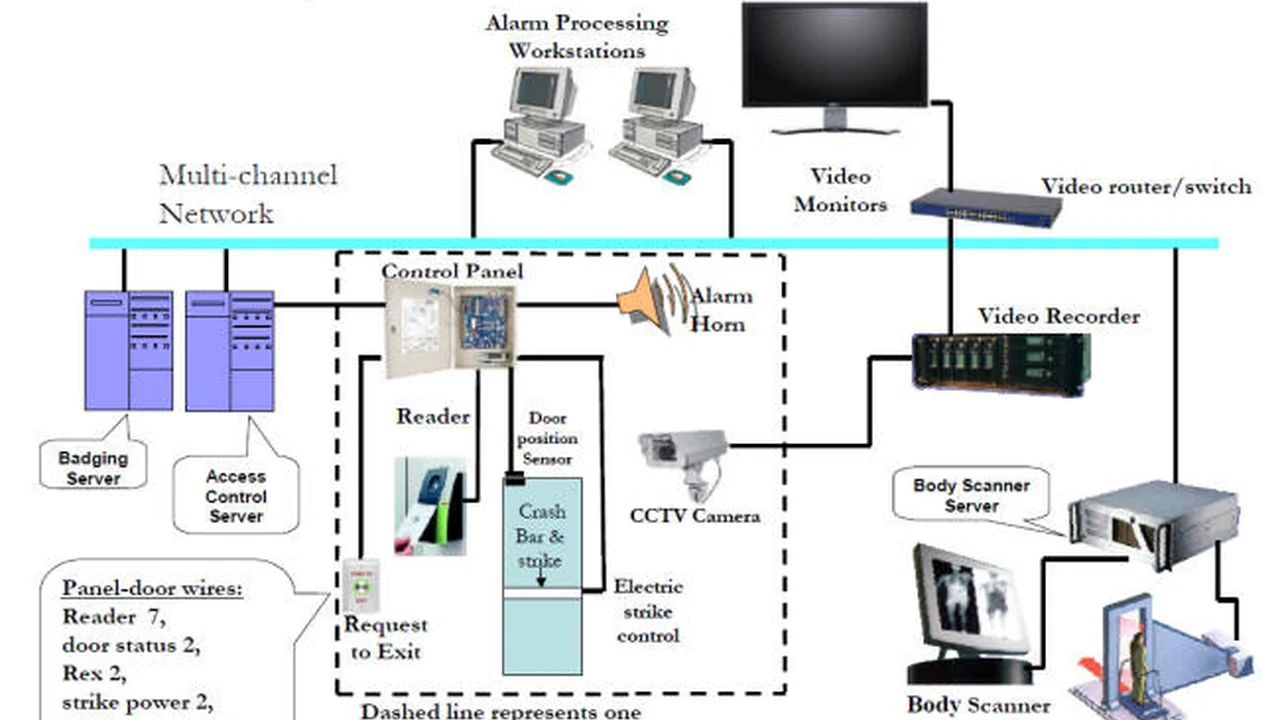
Paxton has been around for a while, building a solid reputation for reliable, user-friendly, and often on-premise access control solutions. Their flagship product, Paxton Net2, is a prime example of this. It's a robust, server-based system that gives you a lot of control right there on your network. Think of it like having your own security command center. You install the software on a dedicated PC or server, and all your access data, user permissions, and event logs are stored locally. This can be a huge plus for organizations with strict data sovereignty requirements or those who prefer to keep everything in-house.
However, Paxton isn't stuck in the past. They've also introduced Paxton10, which is their more modern, integrated solution that combines access control and video management into a single, web-based platform. While it still has an on-premise server component, it offers a more streamlined, browser-based interface, making it more accessible from various devices. It's a step towards cloud-friendliness without fully committing to a pure cloud model.
Key Features of Paxton Net2 Access Control
- Scalability: Net2 can handle everything from a single door to thousands of doors and tens of thousands of users. It's incredibly flexible for growing businesses.
- User-Friendly Software: The Net2 software is known for its intuitive interface, making it relatively easy for security managers to set up and manage.
- Diverse Reader Options: Paxton offers a wide range of readers, including proximity, magstripe, keypad, and even biometric options, allowing for customized security levels.
- Integration Capabilities: Net2 integrates with various third-party systems, such as fire alarms, intruder alarms, and HR databases, creating a more cohesive security ecosystem.
- Event Reporting: Comprehensive reporting features allow you to track who went where and when, which is crucial for auditing and incident investigation.
- Time and Attendance: Built-in time and attendance features can help manage employee hours and streamline payroll processes.
Key Features of Paxton10 Integrated Security Platform
- Unified Platform: Combines access control and video management into one seamless interface, simplifying security operations.
- Web-Based Interface: Accessible from any device with a web browser, offering greater flexibility for management.
- Scalability: Designed to scale from small to large installations, similar to Net2 but with a more modern architecture.
- Smart Credentials: Supports mobile credentials, allowing users to use their smartphones for access.
- Advanced Video Analytics: Offers features like motion detection, object recognition, and heat mapping for smarter surveillance.
- Open API: Provides an open API for integration with other business systems, enhancing its versatility.
Brivo Access Control Systems Cloud-Native Security Solutions
Now, let's shift gears to Brivo. Brivo is a pioneer in cloud-based access control. Their entire philosophy revolves around the cloud, meaning your access control system is managed and accessed entirely over the internet. There's no need for a dedicated server on your premises, which can be a huge advantage for businesses looking to reduce IT infrastructure costs and simplify management. Brivo's flagship product, Brivo Access, is a testament to this cloud-first approach.
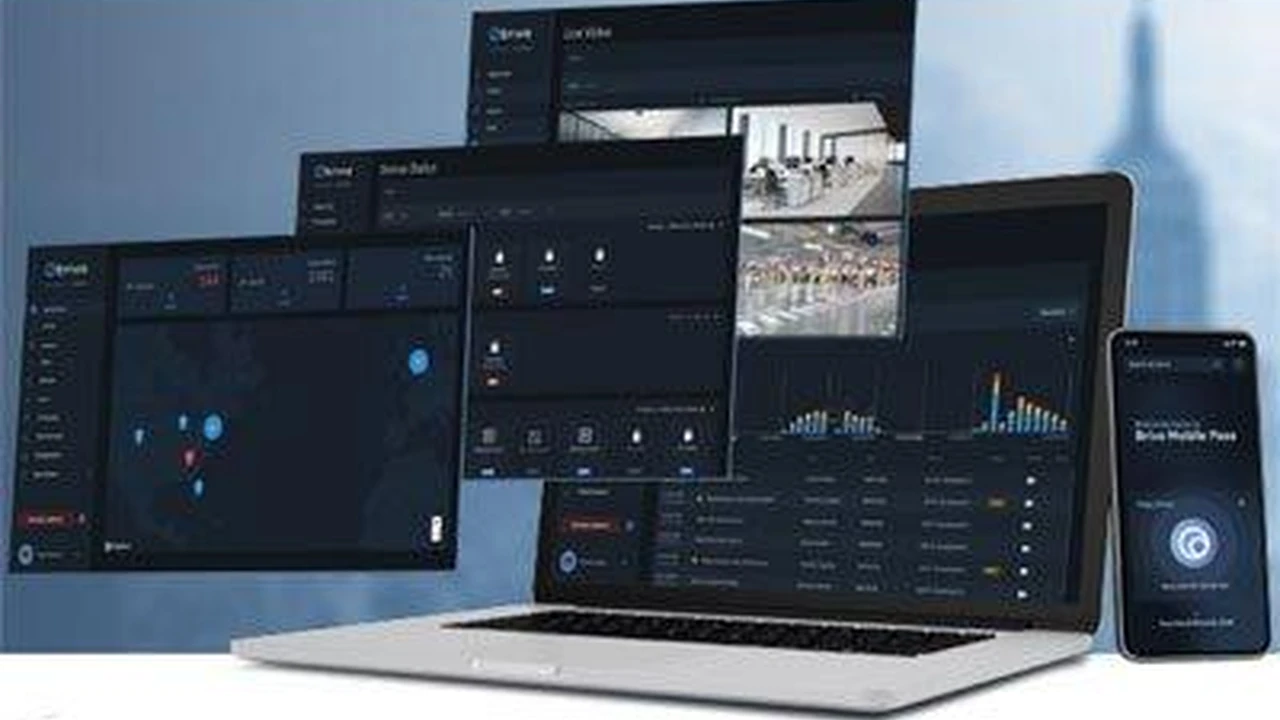
With Brivo, you're essentially subscribing to a service. All your data, configurations, and user information are stored securely in Brivo's cloud. This means you can manage your access control system from anywhere in the world, using any internet-connected device. Updates are pushed automatically, and you don't have to worry about maintaining server hardware or software. It's a truly 'set it and forget it' kind of solution from an IT perspective.
Key Features of Brivo Access Cloud-Based Security
- Cloud-Native Architecture: No on-premise server required, reducing IT overhead and simplifying deployment.
- Remote Management: Manage your access control system from anywhere, anytime, using a web browser or mobile app.
- Scalability: Easily scale your system up or down as your needs change, without significant hardware upgrades.
- Mobile Credentials: Brivo excels in mobile access, allowing users to unlock doors with their smartphones.
- Open API and Integrations: Brivo boasts a vast ecosystem of integrations with other security systems, HR platforms, and smart building technologies.
- Real-time Alerts and Reporting: Get instant notifications of security events and access comprehensive reports for auditing and compliance.
- Visitor Management: Integrated visitor management features streamline guest access and tracking.
- Health and Safety Features: Offers features like occupancy management and contact tracing, which became particularly relevant in recent years.
Paxton vs Brivo Direct Comparison Features and Benefits
Let's put them side-by-side on some key aspects:
Installation and Setup Paxton vs Brivo Ease of Deployment
Paxton: For Net2, installation involves setting up the server software, connecting controllers, and wiring readers. It's a more traditional installation process that might require a bit more technical know-how or professional assistance. Paxton10 simplifies this somewhat with its web-based interface, but still has an on-premise server component.
Brivo: Installation is generally simpler for Brivo. Since it's cloud-based, you're primarily installing the hardware (controllers, readers) and connecting them to the internet. The software management is all done in the cloud. This can lead to faster deployment times and potentially lower installation costs, especially for multi-site deployments.
User Interface and Management Paxton vs Brivo User Experience
Paxton: Net2's software is powerful and comprehensive, but it can have a steeper learning curve for new users. Paxton10 offers a more modern, intuitive web interface that's easier to navigate. Both offer a high degree of control and customization.
Brivo: Brivo's web and mobile interfaces are renowned for their simplicity and ease of use. It's designed to be very intuitive, even for non-technical users. This makes daily management tasks like adding users, granting access, and reviewing events very straightforward.
Scalability and Flexibility Paxton vs Brivo Growth Potential
Paxton: Both Net2 and Paxton10 are highly scalable. Net2 can handle very large, complex installations with ease, and Paxton10 is designed for modern, growing businesses. The on-premise nature of Net2 can be an advantage for very large organizations that prefer to manage their own infrastructure.
Brivo: Brivo's cloud architecture makes it incredibly scalable. Adding new doors or locations is often as simple as adding new hardware and configuring it in the cloud. This is particularly beneficial for businesses with multiple locations or those expecting rapid growth, as it avoids the need for significant on-premise hardware upgrades.
Security and Data Privacy Paxton vs Brivo Data Handling
Paxton: With Net2, your data resides on your local server, giving you direct control over its security and privacy. This can be a significant advantage for organizations with strict compliance requirements. Paxton10 also offers robust security measures for its on-premise server and web interface.
Brivo: Brivo, being cloud-based, relies on robust cloud security measures. They invest heavily in data encryption, redundant servers, and compliance certifications (like SOC 2 Type 2). While your data is not physically on your premises, it's protected by industry-leading security protocols. For some, the idea of data being off-site can be a concern, but for many, the benefits of cloud security outweigh these concerns.
Cost Considerations Paxton vs Brivo Pricing Models
Paxton: Generally, Paxton systems involve an upfront cost for hardware (controllers, readers) and software licenses. For Net2, there's a one-time software purchase. For Paxton10, there might be a combination of hardware costs and potentially recurring software maintenance or cloud service fees, depending on the specific setup. The total cost of ownership can be lower over the long term if you prefer to own your infrastructure.
Brivo: Brivo typically operates on a subscription model. You pay a recurring fee (monthly or annually) for the cloud service, in addition to the upfront cost of hardware. While this means ongoing operational expenses, it often translates to lower initial capital expenditure and predictable budgeting. It also includes automatic updates and support as part of the subscription.
Integrations and Ecosystem Paxton vs Brivo Compatibility
Paxton: Paxton offers a good range of integrations with other security systems, building management systems, and HR software. Their open API allows for custom integrations, providing flexibility for specific business needs.
Brivo: Brivo boasts a very open platform with a vast array of integrations. They actively partner with numerous technology providers, including video surveillance, visitor management, smart locks, and building automation systems. This makes Brivo a strong contender if you're looking to build a highly integrated smart building ecosystem.
Recommended Products and Use Cases Paxton vs Brivo Solutions
Paxton Net2 for Traditional and Robust Security
Recommended for: Large enterprises, government facilities, educational institutions, or any organization with strict data sovereignty requirements and a preference for on-premise control.
Example Product: Paxton Net2 Pro software with Net2 plus controllers and P-series readers.
Use Case: A university campus with multiple buildings and thousands of students and staff. They need granular control over access to labs, dorms, and administrative offices. They have an existing IT infrastructure and a dedicated security team to manage the system. The ability to keep all data on-site is crucial for student privacy regulations.
Estimated Cost Range: For a medium-sized installation (e.g., 20 doors, 500 users), you might be looking at an initial hardware and software cost ranging from $10,000 to $30,000, depending on reader types and installation complexity. Ongoing costs would primarily be for maintenance and potential software upgrades.
Paxton10 for Integrated and Modern Security
Recommended for: Medium to large businesses looking for a unified access control and video management solution with a modern, web-based interface, but still wanting some on-premise control.
Example Product: Paxton10 Server with Paxton10 controllers and cameras, and mobile credentials.
Use Case: A growing tech company with multiple floors in an office building. They want to manage both access and video surveillance from a single platform, accessible by their security team from various devices. They appreciate the ease of use of a web interface and the option for mobile access for employees.
Estimated Cost Range: For a similar medium-sized installation, initial hardware and software costs could range from $15,000 to $40,000, with potential recurring fees for cloud services or advanced features. This would include the server, controllers, cameras, and readers.
Brivo Access for Cloud-First and Flexible Security
Recommended for: Small to medium businesses, multi-site organizations, co-working spaces, residential buildings, or any entity prioritizing ease of management, remote access, and reduced IT overhead.
Example Product: Brivo Access platform with Brivo ACS controllers and smart readers (e.g., Brivo Smart Reader).
Use Case: A chain of retail stores across different cities. They need a centralized system to manage employee access to all locations, easily add or remove staff, and monitor entry/exit events remotely. The cloud-based nature of Brivo means they don't need IT staff at each location, and management can be handled by a central team.
Estimated Cost Range: For a medium-sized installation (e.g., 20 doors, 500 users), initial hardware costs might be in the range of $8,000 to $25,000. The recurring monthly subscription fees could range from $100 to $500+, depending on the number of doors, users, and features selected. This model offers lower upfront costs but ongoing operational expenses.
Making the Right Choice Paxton vs Brivo Decision Factors
So, how do you decide between Paxton and Brivo? It really boils down to your specific needs, priorities, and existing infrastructure. Here are some key questions to ask yourself:
IT Infrastructure and Management Preferences On-Premise vs Cloud
Do you have a dedicated IT team and prefer to manage your security infrastructure on-premise? Paxton Net2 might be a better fit. Do you want to minimize IT overhead and leverage the benefits of cloud computing? Brivo is likely your go-to.
Scalability Requirements Future Growth and Multi-Site Needs
Are you a rapidly growing business or do you have multiple locations? Brivo's cloud-native scalability can be a huge advantage. If you have a stable, large-scale operation that's not expected to change dramatically, Paxton's robust on-premise solutions are perfectly capable.
Budget and Financial Model Upfront vs Recurring Costs
Do you prefer a larger upfront capital expenditure with lower ongoing costs (Paxton)? Or do you prefer lower initial costs with predictable recurring operational expenses (Brivo)?
Integration Needs Ecosystem and Third-Party Compatibility
How important are integrations with other systems (video surveillance, HR, building automation)? Both offer good integration capabilities, but Brivo often has a broader and more actively developed ecosystem of cloud-based integrations.
Security and Data Sovereignty Compliance and Control
Are there specific regulatory or compliance requirements that mandate on-premise data storage? Paxton Net2 gives you direct control. Are you comfortable with your data being securely stored in the cloud by a reputable provider? Brivo's cloud security is top-notch.
User Experience and Ease of Use Daily Operations
How important is an intuitive, easy-to-use interface for your security team? Brivo generally excels here with its streamlined cloud interface. Paxton10 is also very user-friendly, while Net2 might require a bit more training.
Ultimately, both Paxton and Brivo offer excellent access control solutions. Your choice will depend on whether you lean towards the traditional, robust control of an on-premise system or the flexibility, scalability, and reduced IT burden of a cloud-based solution. It's worth getting detailed quotes from both providers and even requesting demos to see which system feels right for your organization. Don't forget to factor in installation costs, ongoing maintenance, and potential future expansion when making your final decision. Happy securing!
:max_bytes(150000):strip_icc()/277019-baked-pork-chops-with-cream-of-mushroom-soup-DDMFS-beauty-4x3-BG-7505-5762b731cf30447d9cbbbbbf387beafa.jpg)