Understanding Different Types of Access Control Readers
Learn about various types of access control readers and their applications in different security environments.
Learn about various types of access control readers and their applications in different security environments. Choosing the right access control reader is crucial for effective security, whether it's for your home, office, or a large industrial complex. This guide will walk you through the different technologies, their pros and cons, and help you make an informed decision.
Understanding Different Types of Access Control Readers
Hey there! So, you're looking into access control readers, huh? That's a smart move. These little gadgets are the gatekeepers of your property, deciding who gets in and who stays out. But with so many options out there, it can feel a bit overwhelming. Don't sweat it, we're going to break down everything you need to know about different types of access control readers, their applications, and even some specific product recommendations. Let's dive in!
What Exactly Are Access Control Readers and Why Do They Matter?
At its core, an access control reader is a device that reads credentials – think key cards, fingerprints, or even your smartphone – and then communicates with an access control panel to grant or deny entry. They're super important because they provide a physical barrier to unauthorized access, track who enters and exits, and can even integrate with other security systems like CCTV. Basically, they're a fundamental part of any robust security setup, giving you peace of mind and control over your space.
Proximity Card Readers The Everyday Workhorse
Let's start with one of the most common types: proximity card readers. You've probably seen these everywhere – offices, gyms, apartment buildings. They work by reading a credential, usually a plastic card or fob, that you simply hold near the reader. No need to swipe or insert, which is super convenient.
How Proximity Readers Work and Their Benefits
These readers use RFID (Radio-Frequency Identification) technology. The card has a tiny antenna and chip inside. When you bring it close to the reader, the reader emits a radio frequency that powers up the chip, allowing it to transmit its unique identification number back to the reader. This number is then sent to the access control system for verification.
The biggest benefits? They're incredibly easy to use, durable, and generally quite affordable. Plus, since there's no physical contact, wear and tear on the reader is minimal. They're also pretty quick, making them ideal for high-traffic areas.
Common Applications and Product Recommendations for Proximity Readers
Proximity readers are perfect for:
- Office Buildings: Granting employees access to different floors or departments.
- Schools and Universities: Controlling access to dorms, labs, and administrative areas.
- Gyms and Health Clubs: Member access.
- Residential Complexes: Entry to common areas or individual units.
Product Spotlight: HID ProxPro II Reader
- Features: Reads HID Prox cards and fobs, weather-resistant, easy to install.
- Use Case: Ideal for general office entry, outdoor gates.
- Price Range: Around $100-$200.
Product Spotlight: Honeywell OmniAssure HID Proximity Reader
- Features: Supports multiple card formats, sleek design, tamper-resistant.
- Use Case: High-security office environments, executive suites.
- Price Range: Around $150-$250.
Smart Card Readers Enhanced Security and Functionality
Stepping up from proximity readers, we have smart card readers. These are also RFID-based, but they offer a significant leap in security and functionality. Instead of just transmitting a static ID number, smart cards can store and process data, often using encryption.
The Technology Behind Smart Card Readers and Their Advantages
Smart cards typically use higher frequency RFID (like 13.56 MHz, compared to proximity's 125 kHz) and can support more advanced encryption protocols. This means they're much harder to clone or compromise. They can also store more information, like biometric templates or multiple access profiles.
The advantages are clear: enhanced security, greater flexibility (one card can do more), and the ability to integrate with other applications like cashless vending or time and attendance systems.
Where Smart Card Readers Shine and Top Product Picks
Smart card readers are excellent for:
- Government Facilities: High-security areas requiring robust authentication.
- Healthcare Institutions: Protecting patient data and restricted areas.
- Corporate Campuses: Multi-functional employee badges.
- Financial Institutions: Secure access to vaults and data centers.
Product Spotlight: HID iCLASS SE R10 Reader
- Features: Supports multiple smart card technologies (iCLASS, MIFARE, DESFire), mobile access ready, highly secure.
- Use Case: Corporate offices, government buildings, any place needing high security and future-proofing.
- Price Range: Around $200-$350.
Product Spotlight: Allegion Schlage AD-200 Series Smart Reader
- Features: Integrates with electronic locks, supports various smart card formats, audit trail capabilities.
- Use Case: Commercial doors, multi-tenant buildings.
- Price Range: Around $300-$500 (for reader module).
Biometric Readers Your Body as Your Key
Now we're getting into some serious security! Biometric readers use unique physical characteristics to grant access. Think fingerprints, facial recognition, iris scans, or even palm veins. No more lost cards or forgotten PINs!
Exploring Different Biometric Technologies and Their Security Levels
Each biometric method has its own strengths:
- Fingerprint Readers: Most common, relatively affordable, and very convenient. They scan the unique patterns of your fingerprint.
- Facial Recognition: Uses cameras to map facial features. Becoming more prevalent, especially with advancements in AI.
- Iris Scanners: Highly accurate, scans the unique patterns in your iris. Very secure but can be more expensive and slower.
- Palm Vein Scanners: Scans the unique vein patterns in your palm. Extremely difficult to spoof.
The security level is generally very high, as biometrics are much harder to fake than a card. However, privacy concerns and potential for false positives/negatives are considerations.
Ideal Scenarios and Recommended Biometric Readers
Biometric readers are best for:
- High-Security Zones: Data centers, research labs, military installations.
- Healthcare: Operating rooms, pharmacies.
- Manufacturing: Restricting access to dangerous machinery.
- Time and Attendance: Accurate clock-in/out.
Product Spotlight: Suprema BioEntry W2 Fingerprint Reader
- Features: IP67 rated (weatherproof), vandal-resistant, advanced fingerprint algorithm, supports multiple card technologies.
- Use Case: Outdoor gates, construction sites, high-traffic areas needing robust biometric security.
- Price Range: Around $500-$800.
Product Spotlight: ZKTeco SpeedFace V5L Facial Recognition Terminal
- Features: Visible light facial recognition, palm recognition, fingerprint, and RFID card options, mask detection.
- Use Case: Office buildings, schools, factories, especially where touchless entry is preferred.
- Price Range: Around $400-$700.
Mobile Access Readers Your Smartphone as Your Key
Welcome to the future! Mobile access readers allow you to use your smartphone as your credential. No more fumbling for cards – your phone is usually already in your hand.
How Mobile Access Works and Its Convenience Factor
These readers communicate with your smartphone via Bluetooth Low Energy (BLE) or Near Field Communication (NFC). You typically download an app, and your phone generates a secure digital credential. When you approach the reader, the app communicates with it, and access is granted.
The convenience factor is huge. Everyone has their phone, and it's much harder to lose than a small card. Plus, credentials can be issued and revoked remotely, making management a breeze.
Best Applications and Product Recommendations for Mobile Access
Mobile access is fantastic for:
- Modern Offices: Tech companies, co-working spaces.
- Residential Buildings: Tenant convenience.
- Hotels: Keyless entry for guests.
- Anywhere you want a seamless, modern experience.
Product Spotlight: HID Signo 20 Reader
- Features: Supports mobile access (BLE/NFC), smart cards, and proximity cards, highly versatile, secure.
- Use Case: Any modern facility looking to upgrade to mobile access while maintaining compatibility with older cards.
- Price Range: Around $250-$400.
Product Spotlight: Openpath Smart Reader 2
- Features: Triple-unlock technology (Wave to Unlock, Mobile, Card), cloud-based, robust security.
- Use Case: Enterprise-level deployments, smart buildings, where a premium, touchless experience is desired.
- Price Range: Around $350-$600.
Keypad Readers Simple and Effective
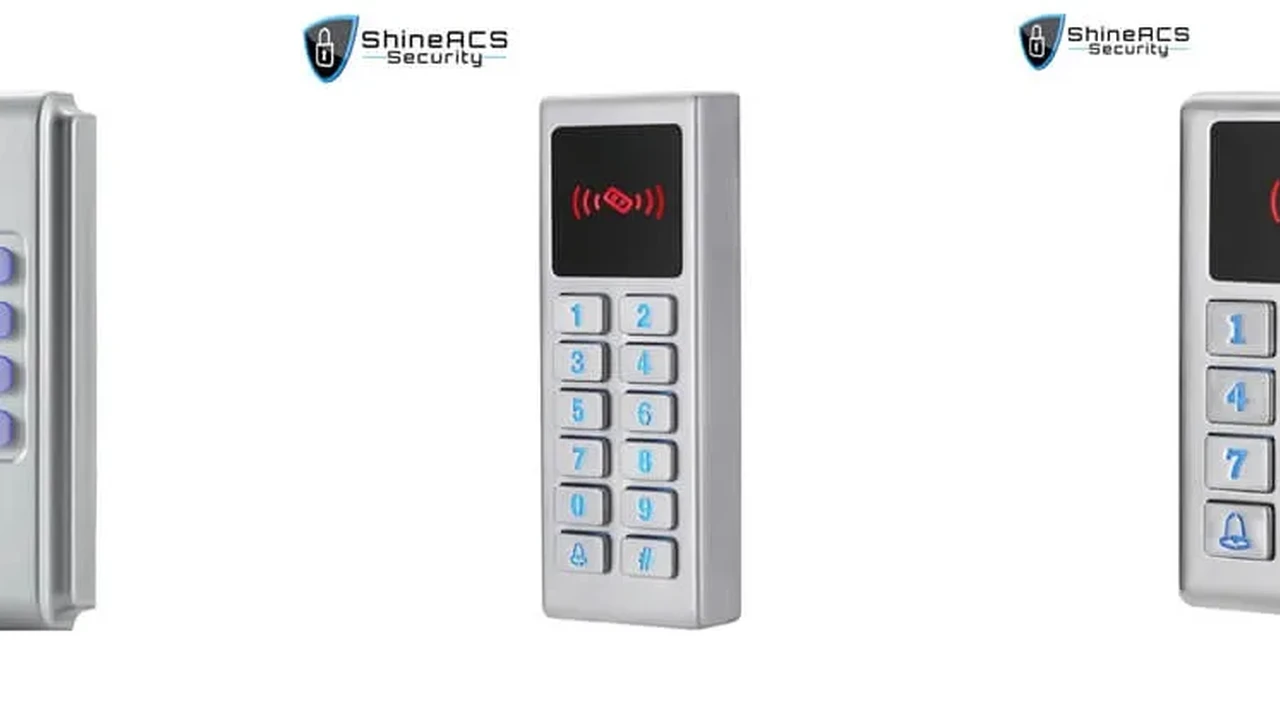
Sometimes, simple is best. Keypad readers require you to enter a PIN or code to gain access. They're straightforward, reliable, and don't require any physical credentials.
The Simplicity and Security of Keypad Readers
Keypads are easy to install and manage. You just program a code, and users enter it. They can be standalone or integrated into a larger system. While a single PIN isn't as secure as a smart card or biometric, they offer a good balance of security and convenience for many applications.
For enhanced security, many keypads offer multi-factor authentication, requiring a PIN plus a card or biometric.
Where Keypad Readers Fit Best and Recommended Models
Keypad readers are great for:
- Small Businesses: Simple entry for employees.
- Storage Units: Individual unit access.
- Server Rooms: Secondary authentication.
- Residential Garages: Easy access for family members.
Product Spotlight: Schlage CO-200 Standalone Keypad Lock
- Features: Standalone (no wiring to a central system), easy to program, durable.
- Use Case: Small offices, storage rooms, residential back doors.
- Price Range: Around $300-$600 (for a full lockset).
Product Spotlight: Seco-Larm Enforcer SK-1323-SDQ Keypad
- Features: Weatherproof, 1000 user codes, tamper alarm, backlit keys.
- Use Case: Outdoor gates, commercial entryways, where a robust standalone keypad is needed.
- Price Range: Around $80-$150.
Long-Range Readers For Vehicle and Hands-Free Access
Imagine driving up to a gate, and it just opens. That's the magic of long-range readers. These are designed for situations where you need to grant access from a distance, often for vehicles.
How Long-Range Readers Work and Their Unique Advantages
Long-range readers typically use UHF (Ultra High Frequency) RFID technology. A tag, often placed on a vehicle's windshield or rearview mirror, communicates with the reader from several meters away. This allows for hands-free access, which is incredibly convenient.
The main advantage is speed and convenience, especially for vehicle access. No need to stop, roll down a window, or swipe a card. This reduces traffic congestion and improves efficiency.
Ideal Applications and Product Recommendations for Long-Range Readers
Long-range readers are perfect for:
- Gated Communities: Vehicle entry for residents.
- Parking Garages: Employee or authorized vehicle access.
- Logistics and Warehouses: Tracking vehicles and assets.
- Toll Booths: Automated payment and access.
Product Spotlight: Nedap uPASS Access Reader
- Features: Reads UHF tags up to 10 meters, robust design, easy integration.
- Use Case: Vehicle access control for parking lots, gated communities, industrial sites.
- Price Range: Around $1000-$2000.
Product Spotlight: Impinj R700 RFID Reader (for industrial applications)
- Features: High-performance, enterprise-grade reader, ideal for large-scale asset tracking and vehicle identification.
- Use Case: Large logistics centers, manufacturing plants, where precise long-range tracking is critical.
- Price Range: Around $1500-$3000.
Comparing the Different Reader Types Which One is Right for You?
Okay, so we've covered a lot of ground! Here's a quick rundown to help you compare and decide:
| Reader Type | Security Level | Convenience | Cost (Reader Only) | Best For |
|---|---|---|---|---|
| Proximity Card | Medium | High | $100 - $250 | General office, residential, high-traffic areas |
| Smart Card | High | High | $200 - $500 | High-security offices, government, healthcare |
| Biometric | Very High | Medium-High | $400 - $1000+ | High-security zones, data centers, time & attendance |
| Mobile Access | High | Very High | $250 - $600 | Modern offices, residential, hotels, seamless experience |
| Keypad | Low-Medium | Medium | $80 - $600 | Small businesses, storage, secondary authentication |
| Long-Range | Medium-High | Very High | $1000 - $3000 | Vehicle access, gated communities, parking garages |
When making your choice, think about:
- Your Security Needs: How critical is the area you're protecting?
- User Experience: How convenient do you want it to be for people?
- Budget: What's your financial limit for installation and ongoing costs?
- Scalability: Do you plan to expand your system in the future?
- Environment: Is it indoors or outdoors? Does it need to be weatherproof or vandal-resistant?
Installation and Integration Tips for Access Control Readers
Once you've picked your reader, getting it installed and integrated correctly is key. Here are a few pointers:
Proper Placement and Wiring Considerations
Make sure your reader is placed at an accessible height for all users, including those with disabilities. For outdoor readers, consider protection from the elements and potential vandalism. Wiring is crucial – ensure you use the correct gauge wire and follow manufacturer instructions for power and data connections. Poor wiring can lead to unreliable performance or even system failure.
Integrating Readers with Your Overall Security System
Most modern access control readers are designed to integrate seamlessly with a central access control panel. This panel is the brain of your system, managing user databases, access schedules, and event logging. You'll want to ensure compatibility between your chosen reader and your access control software. Many systems also allow integration with other security components like CCTV cameras (to record who enters), alarm systems (to disarm upon entry), and even building management systems.
Keeping Your Access Control Readers Up-to-Date and Secure
Just like any tech, access control readers need a little love to keep them running smoothly and securely.
Regular Maintenance and Firmware Updates
Periodically clean your readers, especially biometric ones, to ensure optimal performance. Keep an eye out for firmware updates from the manufacturer. These updates often include security patches, bug fixes, and new features that can enhance your system's capabilities and protection.
Protecting Against Tampering and Cyber Threats
Physical tampering is a real threat. Choose readers with tamper switches that alert you if someone tries to remove or damage them. On the cyber front, ensure your access control system's network is secure, using strong passwords and encryption. If your system is cloud-based, make sure your provider has robust cybersecurity measures in place. Regularly review access logs to spot any unusual activity.
So there you have it! A deep dive into the world of access control readers. Hopefully, this helps you figure out the best fit for your security needs. Stay safe out there!
:max_bytes(150000):strip_icc()/277019-baked-pork-chops-with-cream-of-mushroom-soup-DDMFS-beauty-4x3-BG-7505-5762b731cf30447d9cbbbbbf387beafa.jpg)