Integrating Access Control with Time and Attendance
Learn how to integrate access control systems with time and attendance software for streamlined operations.
Learn how to integrate access control systems with time and attendance software for streamlined operations.
Integrating Access Control with Time and Attendance for Streamlined Operations
Hey there! Ever wondered how to make your workplace run smoother, especially when it comes to managing who's coming and going, and how long they're actually working? Well, you're in luck because today we're diving deep into the world of integrating access control systems with time and attendance software. This isn't just some fancy tech talk; it's about making your life, and your employees' lives, a whole lot easier and more efficient. We're talking about cutting down on manual tasks, boosting accuracy, and even saving some cash in the long run. So, let's get started!
Why Integrate Access Control and Time and Attendance Systems?
You might be thinking, "Why bother integrating these two systems? They seem to do different things." And you'd be right, to an extent. Access control is all about security – making sure only authorized people can get into certain areas. Time and attendance, on the other hand, is about tracking work hours for payroll and compliance. But here's the kicker: when you bring them together, they create a powerhouse solution that offers benefits far beyond what each system can do on its own. Think about it: every time an employee swipes their badge to enter the building, that's not just an access event; it's also a potential clock-in. And when they leave, it's a clock-out. Seamless, right?
Enhanced Accuracy and Reduced Manual Errors in Time Tracking
Let's be real, manual timekeeping is a pain. Punch cards get lost, timesheets get filled out incorrectly, and sometimes, well, people just forget. This leads to errors, which can mean overpaying or underpaying employees, and nobody wants that. By integrating access control, every entry and exit event is automatically recorded and sent to your time and attendance system. This drastically reduces the chances of human error. No more deciphering messy handwriting or chasing down employees for forgotten clock-ins. It's all automated, precise, and reliable.
Improved Security and Compliance with Integrated Systems
Beyond just tracking hours, this integration significantly beefs up your security. You're not just knowing who's in the building; you're also verifying their presence against their scheduled work hours. This can help identify discrepancies or unauthorized access attempts more quickly. Plus, for industries with strict compliance regulations, having an automated, verifiable record of employee presence is a huge win. It makes audits a breeze and helps ensure you're always meeting those pesky regulatory requirements.
Streamlined Payroll Processing and Cost Savings
Payroll can be a headache, especially for larger organizations. Manually calculating hours, dealing with overtime, and correcting errors takes a lot of time and resources. With an integrated system, all that data flows directly into your payroll software. This means faster processing, fewer payroll errors, and ultimately, significant cost savings. Think about the hours your HR and accounting teams will save – hours they can then dedicate to more strategic tasks. It's a win-win!
How Access Control and Time and Attendance Integration Works
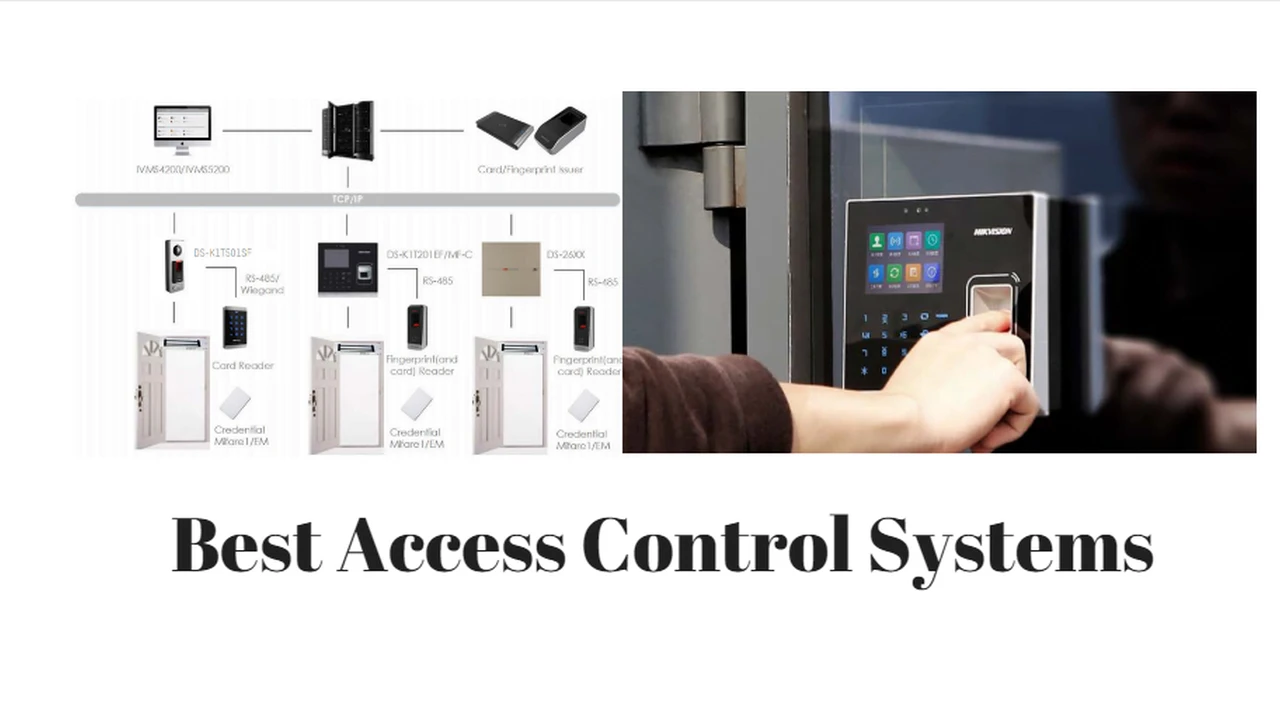
So, how does this magic happen? At its core, the integration involves your access control system (which uses things like key cards, biometrics, or mobile credentials) communicating directly with your time and attendance software. When an employee uses their credential to gain access, that event is timestamped and recorded. This data is then shared with the time and attendance system, which interprets it as a clock-in or clock-out.
Data Flow and Communication Protocols for Seamless Integration
The key to a successful integration lies in how these two systems talk to each other. This usually involves APIs (Application Programming Interfaces) or other data exchange protocols. When an access event occurs, the access control system sends a data packet containing information like the employee's ID, the time, and the location of the access point. The time and attendance system then receives this data, matches it to the employee's profile, and updates their time record. It's like a digital handshake between two systems, ensuring all the necessary information is passed along accurately and in real-time.
Types of Access Control Credentials for Time Tracking
There are several ways employees can clock in and out using an integrated system:
- RFID/Proximity Cards: These are your standard key cards. Employees simply tap or swipe their card at a reader, and the system records their entry/exit. They're widely used, affordable, and generally reliable.
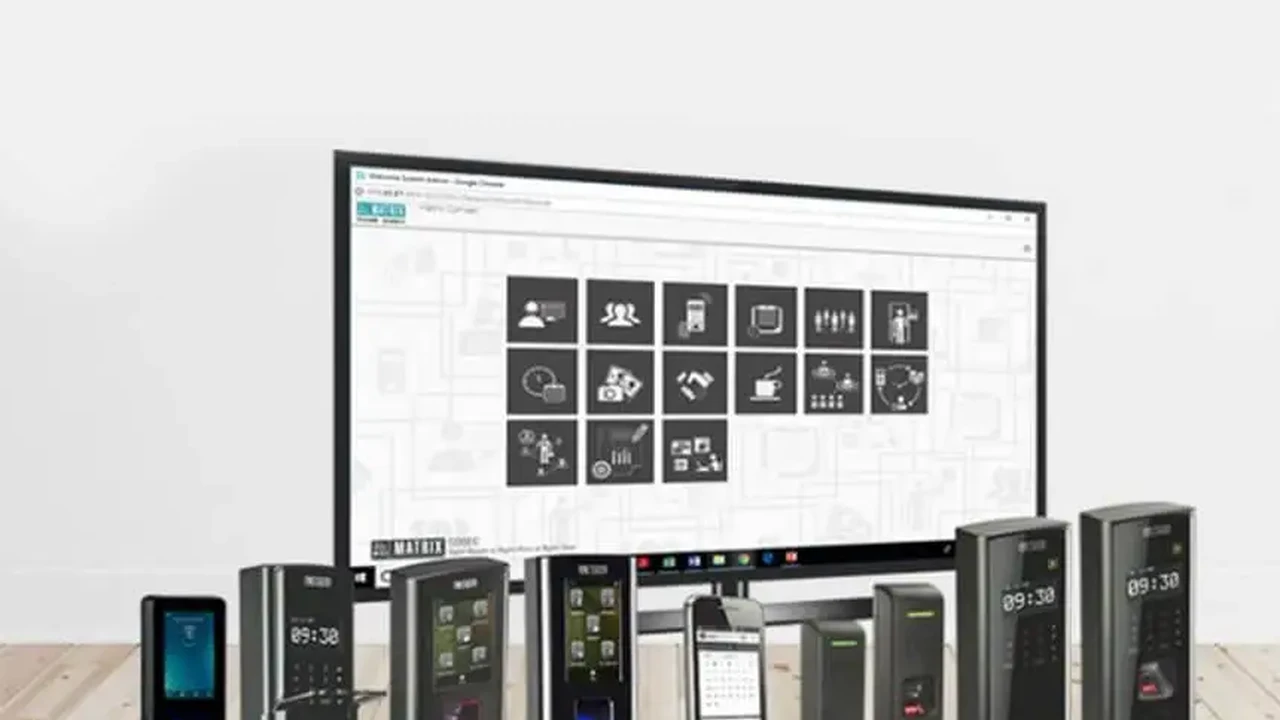
- Biometric Scanners: This includes fingerprint, facial recognition, or iris scanners. These offer a higher level of security as they rely on unique biological traits, making 'buddy punching' virtually impossible. They're also super convenient for employees – no need to remember a card or code.
- Mobile Credentials: With the rise of smartphones, many systems now allow employees to use their mobile devices as their access credential. This can be done via NFC (Near Field Communication) or Bluetooth, offering a modern and convenient solution.
- PIN Codes: While less secure than other methods, PIN codes can still be integrated, often as a backup or for specific low-security areas.
Key Features to Look for in Integrated Solutions
When you're shopping around for an integrated access control and time and attendance solution, there are a few must-have features that will make a big difference in its effectiveness and ease of use.
Real-time Data Synchronization and Reporting
You want a system that updates in real-time. This means as soon as an employee clocks in or out, that data should be immediately available in your time and attendance records. Real-time data is crucial for accurate payroll, quick decision-making, and monitoring employee presence. Look for robust reporting features that allow you to generate custom reports on attendance, tardiness, overtime, and more. This data can be invaluable for operational insights and compliance.
Scalability and Flexibility for Growing Businesses
Your business isn't static, and neither should your security and timekeeping systems be. Choose a solution that can grow with you. This means it should be easy to add new employees, new access points, and even new locations without a complete overhaul. Cloud-based solutions often excel here, offering inherent scalability and remote management capabilities. Flexibility in configuration is also important, allowing you to adapt the system to your specific policies and workflows.
User-Friendly Interface and Mobile Access
No one wants to deal with a clunky, complicated system. Look for solutions with an intuitive, user-friendly interface that makes it easy for administrators to manage and for employees to use. Mobile access is also a huge plus. This allows employees to view their timecards, request time off, and even clock in/out from their smartphones (if appropriate for your business model), adding a layer of convenience and flexibility.
Recommended Integrated Access Control and Time and Attendance Products
Alright, let's get down to some specifics. There are a ton of great options out there, but here are a few that stand out for their integration capabilities, features, and overall reliability. Keep in mind that pricing can vary wildly based on the number of users, features, and whether you opt for cloud-based or on-premise solutions.
1. Kisi Access Control with When I Work Time Tracking
Overview: Kisi is a modern, cloud-based access control system known for its ease of use and robust API. When I Work is a popular employee scheduling and time tracking software. Their integration is quite seamless, making it a great choice for businesses looking for a modern, mobile-first solution.
Key Features:
- Kisi: Cloud-managed access, mobile credentials, key card support, visitor management, real-time access logs, open API.
- When I Work: Employee scheduling, time clock (web, mobile, kiosk), payroll integration, labor forecasting, team messaging.
- Integration Benefits: Automatically clock employees in/out based on Kisi access events. Reduces manual entry and ensures accurate timekeeping.
Ideal Use Case: Small to medium-sized businesses, co-working spaces, retail, and offices that value mobile convenience and cloud management. Great for companies with flexible work schedules or multiple locations.
Estimated Pricing:
- Kisi: Starts around $49/month for basic access control, plus hardware costs (readers, controllers). Hardware can range from $500 - $2000+ per door.
- When I Work: Starts around $4 per user per month for time tracking features.
- Total Estimated Cost: Expect to pay a few hundred dollars per month for software, plus initial hardware investment.
2. Honeywell Pro-Watch Integrated Security Suite
Overview: Honeywell is a giant in the security industry, and their Pro-Watch suite is a comprehensive solution designed for larger enterprises. It integrates access control, video surveillance, and intrusion detection, and can be extended to include time and attendance through various modules or third-party integrations.
Key Features:
- Pro-Watch: Enterprise-grade access control, advanced reporting, visitor management, alarm management, video integration, scalability for thousands of users and doors.
- Time & Attendance: Often integrated via modules or partnerships with leading time and attendance software providers, offering robust time tracking, payroll export, and compliance features.
- Integration Benefits: Centralized management of security and workforce data. High level of customization and robust reporting for complex organizational needs.
Ideal Use Case: Large corporations, government facilities, industrial sites, and organizations with complex security requirements and a need for a highly integrated, on-premise or hybrid solution.
Estimated Pricing:
- Honeywell Pro-Watch: This is an enterprise-level solution, so pricing is typically custom-quoted. Expect significant upfront costs for software licenses and hardware, potentially tens of thousands to hundreds of thousands of dollars, plus ongoing maintenance and support.
- Time & Attendance Module/Integration: Additional costs depending on the chosen solution.
3. Brivo Access Control with ADP Workforce Now
Overview: Brivo is a leading cloud-based access control provider, known for its robust security and ease of management. ADP Workforce Now is a comprehensive human capital management (HCM) platform that includes payroll, HR, benefits, and time and attendance. Their integration is powerful for businesses looking for an all-in-one HR and security solution.
Key Features:
- Brivo: Cloud-based access control, mobile credentials, visitor management, real-time alerts, open API, integrates with various security cameras.
- ADP Workforce Now: Full-suite HR platform, including time and attendance, payroll processing, benefits administration, talent management, and compliance.
- Integration Benefits: Employee data from ADP can automatically populate Brivo, and access events from Brivo can feed directly into ADP's time and attendance module, streamlining HR and security operations.
Ideal Use Case: Medium to large businesses that are already using or considering ADP for their HR and payroll needs, and want a tightly integrated cloud-based access control solution.
Estimated Pricing:
- Brivo: Cloud subscription starts around $70-$100/month for basic features, plus hardware costs (readers, controllers). Hardware can range from $500 - $2000+ per door.
- ADP Workforce Now: Pricing is typically per employee per month and can vary widely based on modules chosen. Expect $20-$50+ per employee per month for a comprehensive package.
- Total Estimated Cost: A few hundred to several thousand dollars per month, depending on company size and features.
4. Smarter Security Fastlane Turnstiles with TimeClock Plus
Overview: This is a more specialized integration, focusing on high-traffic environments where physical barriers are essential. Smarter Security's Fastlane turnstiles provide robust physical access control, and when integrated with TimeClock Plus, they offer a highly accurate and secure way to track employee time.
Key Features:
- Fastlane Turnstiles: High-security optical turnstiles, anti-tailgating technology, various credential readers (card, biometric), aesthetic design.
- TimeClock Plus: Dedicated time and attendance software, robust scheduling, leave management, payroll integration, compliance reporting.
- Integration Benefits: Extremely accurate time tracking at entry/exit points, preventing 'buddy punching' and ensuring only authorized personnel enter. Ideal for secure facilities.
Ideal Use Case: Manufacturing plants, data centers, corporate headquarters with high security needs, government buildings, and any facility requiring strict control over physical entry and exit for timekeeping purposes.
Estimated Pricing:
- Fastlane Turnstiles: Turnstiles are a significant investment, often starting from $10,000 - $30,000+ per lane, depending on features and design.
- TimeClock Plus: Software pricing is typically subscription-based, per employee per month, ranging from $5-$15+.
- Total Estimated Cost: High initial hardware investment, plus ongoing software subscription.
Implementation Considerations for Your Integrated System
So, you're convinced an integrated system is the way to go. Awesome! But before you jump in, there are a few things you'll want to consider to make sure your implementation goes smoothly and you get the most out of your new setup.
Assessing Your Current Infrastructure and Needs
First things first, take a good look at what you've already got. Do you have an existing access control system? Is it old or new? What about your time and attendance process – is it manual, or do you use some software already? Understanding your current setup will help you determine what kind of integration is feasible and what new hardware or software you might need. Also, clearly define your needs: what problems are you trying to solve? What features are absolutely essential for your business?
Choosing Between Cloud-Based and On-Premise Solutions
This is a big one. Cloud-based solutions (SaaS) are hosted by the vendor and accessed via the internet. They typically involve lower upfront costs, easier scalability, and automatic updates. On-premise solutions, on the other hand, are installed and managed on your own servers. They offer more control and customization but come with higher upfront costs and require more IT resources for maintenance. For most small to medium businesses, cloud-based is often the simpler and more cost-effective choice, but larger enterprises with specific security or compliance needs might prefer on-premise or a hybrid approach.
Data Security and Privacy Best Practices
You're dealing with sensitive employee data here, so data security and privacy are paramount. Make sure any solution you choose has robust security features, including encryption, secure data storage, and access controls. Understand how the vendor handles your data, especially if it's a cloud-based solution. Compliance with regulations like GDPR or CCPA might also be a factor, depending on your location and industry. Always prioritize vendors with a strong track record in data security.
Training and Support for Your Team
Even the best system is useless if no one knows how to use it. Plan for comprehensive training for your HR, IT, and security teams. They'll need to understand how to manage the system, generate reports, and troubleshoot common issues. Also, check what kind of customer support the vendor offers. Is it 24/7? Do they have a knowledge base or online tutorials? Good support can be a lifesaver when you're getting started or run into unexpected problems.
Common Challenges and How to Overcome Them
No system implementation is without its bumps in the road. But by being aware of potential challenges, you can better prepare and overcome them.
Integration Complexities and Compatibility Issues
Sometimes, getting two different software systems to talk to each other can be like trying to get two stubborn toddlers to share a toy. Compatibility issues can arise, especially if one system is older or uses proprietary technology. This is where open APIs and standardized communication protocols become crucial. Work closely with your vendors to ensure their systems are truly compatible and that the integration process is well-documented. Don't be afraid to ask for case studies or references from other businesses that have successfully integrated the same systems.
Employee Adoption and Training Resistance
Change can be hard, and some employees might resist a new way of clocking in or out. They might be used to their old methods, or they might have privacy concerns about biometric data. Address these concerns head-on with clear communication and thorough training. Explain the benefits to them – like more accurate paychecks and less hassle. If using biometrics, ensure you have clear policies and communicate how the data is stored and protected. Make the transition as smooth as possible, perhaps by running the old and new systems in parallel for a short period.
Ongoing Maintenance and System Updates
An integrated system isn't a 'set it and forget it' solution. It requires ongoing maintenance, updates, and occasional troubleshooting. For cloud-based systems, many updates are handled automatically by the vendor, which is a huge plus. For on-premise solutions, you'll need dedicated IT resources. Plan for regular system checks, software updates, and hardware maintenance to ensure everything continues to run smoothly. Staying on top of updates also ensures you benefit from new features and security patches.
The Future of Integrated Security and Workforce Management
The world of security and workforce management is constantly evolving, and integration is only going to become more sophisticated. We're already seeing trends that point to even more seamless and intelligent systems.
AI and Machine Learning in Time and Attendance
Artificial intelligence and machine learning are poised to revolutionize time and attendance. Imagine systems that can predict staffing needs based on historical data, automatically detect anomalies in clock-in/out patterns (like potential 'buddy punching' attempts), or even optimize schedules based on employee preferences and business demands. AI can also enhance security by identifying unusual access patterns that might indicate a breach.
Biometric Advancements and Touchless Access
Biometrics are already here, but they're getting even better. We're seeing more accurate facial recognition, iris scanning, and even vein pattern recognition. The push for touchless access, especially in a post-pandemic world, is accelerating the adoption of these technologies. Imagine walking into work, and your presence is automatically registered without you having to touch anything – that's the future we're heading towards.
Further Integration with HR and Payroll Systems
While we've talked about integrating with time and attendance, the trend is towards even deeper integration with broader HR and payroll systems. This means a truly unified platform where employee onboarding, benefits, performance management, and security access are all managed from a single source of truth. This level of integration promises unparalleled efficiency and data consistency across the entire employee lifecycle.
So, there you have it! Integrating access control with time and attendance isn't just a good idea; it's becoming a necessity for modern businesses looking to optimize their operations, enhance security, and ensure accurate payroll. By choosing the right solution and planning your implementation carefully, you can unlock a whole new level of efficiency and peace of mind. Happy integrating!
:max_bytes(150000):strip_icc()/277019-baked-pork-chops-with-cream-of-mushroom-soup-DDMFS-beauty-4x3-BG-7505-5762b731cf30447d9cbbbbbf387beafa.jpg)