Comparing NVR vs DVR for CCTV Systems
Understand the differences between NVR and DVR recording systems for CCTV to choose the best storage solution.
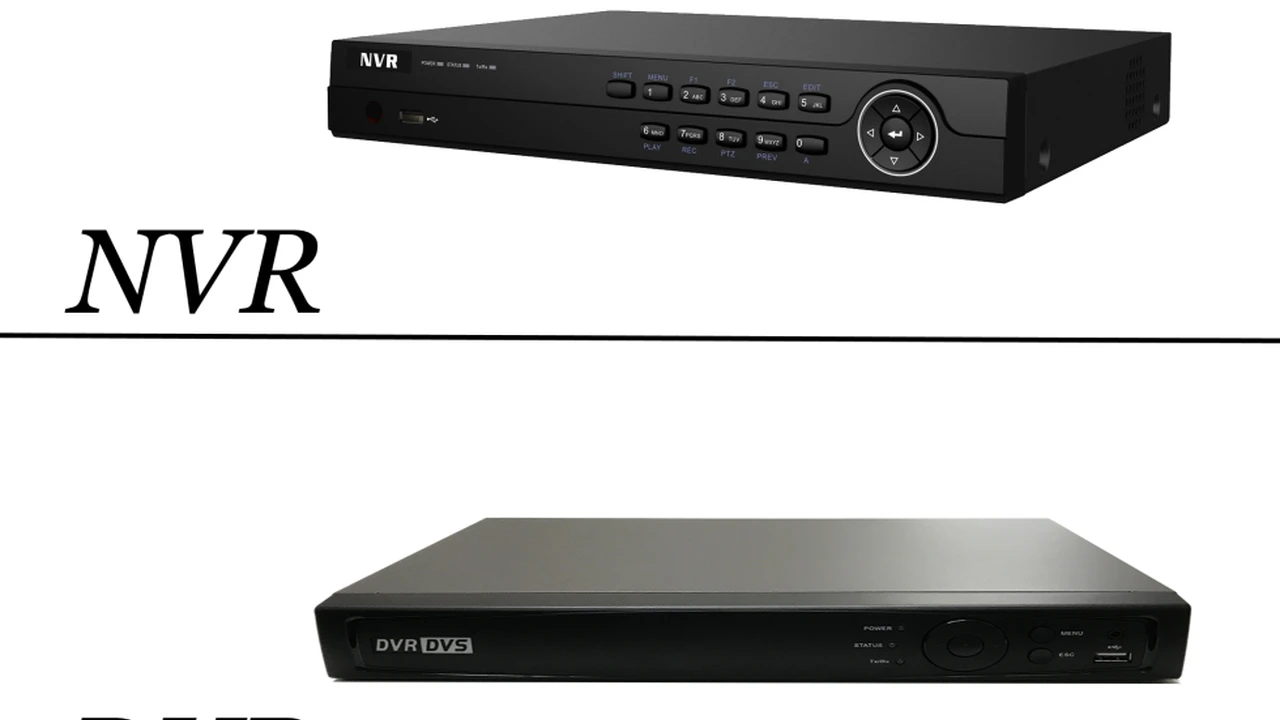
Understand the differences between NVR and DVR recording systems for CCTV to choose the best storage solution.
Comparing NVR vs DVR for CCTV Systems Choosing Your Ideal Surveillance Recorder
When you're setting up a CCTV surveillance system, one of the most crucial decisions you'll face is choosing between a Network Video Recorder (NVR) and a Digital Video Recorder (DVR). These devices are the brains of your surveillance setup, responsible for recording, storing, and managing all the video footage captured by your cameras. Making the right choice isn't just about cost; it's about compatibility, scalability, image quality, and the overall effectiveness of your security system. This comprehensive guide will break down NVRs and DVRs, compare their features, discuss their ideal use cases, and recommend specific products to help you make an informed decision for your home or business.
Understanding DVR Systems Digital Video Recorders Explained
A DVR, or Digital Video Recorder, is the traditional choice for CCTV systems. It works with analog cameras, which transmit video signals over coaxial cables. The DVR itself converts these analog signals into a digital format, compresses them, and then stores them on a hard drive. Think of it as a central hub where all your analog cameras plug in directly.
How DVR Systems Work The Analog to Digital Conversion Process
In a DVR system, each analog camera connects to the DVR via a coaxial cable. These cables carry the raw analog video signal. The DVR unit contains an analog-to-digital converter (ADC) chip for each channel (camera input). This chip takes the analog video stream, digitizes it, and then processes it for storage. This conversion happens at the DVR, which means the quality of the video is largely dependent on the DVR's processing capabilities and the quality of the analog camera itself. Power for the cameras is often supplied separately or through the same coaxial cable using baluns.
Key Features and Benefits of DVR Surveillance Systems
- Cost-Effectiveness: Generally, DVR systems are more affordable upfront, especially if you already have existing analog cabling.
- Simplicity: They are often simpler to set up for basic surveillance needs, particularly for smaller installations.
- Reliability: Coaxial cables are less susceptible to network interference compared to IP networks.
- Mature Technology: DVR technology has been around for a long time, making it well-understood and widely supported.
Limitations and Drawbacks of DVR Security Solutions
- Lower Resolution: Analog cameras typically offer lower resolutions (e.g., 720p, 1080p) compared to IP cameras, which can impact image clarity and detail.
- Limited Scalability: Expanding a DVR system can be more complex, often requiring additional DVR units or more extensive cabling.
- Cabling Complexity: Each camera requires a separate coaxial cable run back to the DVR, which can be cumbersome for larger installations.
- Less Flexibility: Features like Power over Ethernet (PoE) are not natively supported, and advanced analytics are often limited.
- Image Quality Degradation: Analog signals can degrade over long cable runs, affecting video quality.
Recommended DVR Products for Home and Small Business Security
For those looking for a reliable and budget-friendly DVR solution, here are a few popular options:
1. ZOSI 8-Channel 1080p DVR Security System
- Description: A popular choice for home and small business use, offering 1080p recording with a user-friendly interface. It often comes bundled with weather-resistant cameras.
- Features: 8 channels, 1080p recording, motion detection, remote viewing via app, night vision cameras.
- Use Case: Ideal for monitoring a small home, garage, or a small retail store.
- Pros: Affordable, easy to install for basic setups, good image quality for its price point.
- Cons: Limited advanced features, cameras are typically fixed lens.
- Estimated Price: $150 - $300 (depending on included cameras and hard drive size).
2. ANNKE 16-Channel 5MP Lite DVR System
- Description: A step up in resolution, offering 5MP Lite recording, which provides clearer images than standard 1080p. Suitable for slightly larger properties.
- Features: 16 channels, 5MP Lite recording, H.265+ video compression, smart motion detection, remote access.
- Use Case: Medium-sized homes, small offices, or warehouses where more detail is required.
- Pros: Higher resolution, efficient compression, supports more cameras.
- Cons: Still uses coaxial cables, not as flexible as NVR systems.
- Estimated Price: $250 - $500.
Exploring NVR Systems Network Video Recorders for IP Cameras
An NVR, or Network Video Recorder, is designed to work with IP (Internet Protocol) cameras. Unlike DVRs, NVRs don't process analog signals. Instead, IP cameras themselves digitize and often compress the video footage before sending it to the NVR over a network (typically Ethernet). This fundamental difference leads to significant advantages in terms of image quality, flexibility, and advanced features.
How NVR Systems Operate The Digital Network Advantage
In an NVR system, each IP camera is essentially a mini-computer with its own processor. It captures video, digitizes it, and often compresses it before transmitting the digital stream over an Ethernet cable. These cameras connect to the NVR via a network switch, which can be integrated into the NVR (PoE NVR) or a separate device. The NVR's primary role is to receive these digital streams, store them, and provide an interface for viewing and managing the footage. Since the video is already digital, there's no analog-to-digital conversion at the NVR, preserving the original image quality.
Key Features and Advantages of NVR Surveillance Solutions
- Superior Image Quality: IP cameras can offer significantly higher resolutions (e.g., 4MP, 8MP/4K, 12MP), providing much clearer and more detailed images.
- Power over Ethernet (PoE): Many NVRs and IP cameras support PoE, meaning a single Ethernet cable can provide both power and data, simplifying installation.
- Greater Flexibility and Scalability: IP cameras can be located anywhere on a network, not just directly connected to the NVR. This allows for greater distances and easier expansion.
- Advanced Analytics: IP cameras and NVRs often come with built-in intelligent features like facial recognition, object detection, line crossing detection, and heat mapping.
- Wireless Options: Many IP cameras offer wireless connectivity, further reducing cabling needs.
- Enhanced Security: Digital video streams can be encrypted, offering better protection against unauthorized access.
Potential Challenges and Considerations for NVR Deployments
- Higher Cost: NVR systems and IP cameras are generally more expensive than their DVR counterparts.
- Network Dependency: Reliance on a stable network connection means potential vulnerabilities to network issues or cyber threats.
- Bandwidth Consumption: High-resolution IP cameras can consume significant network bandwidth, which needs to be managed effectively.
- Setup Complexity: Setting up an NVR system can be slightly more complex due to network configuration requirements.
Top NVR Products for Advanced Home and Business Security
For those prioritizing high-resolution, advanced features, and scalability, NVRs are the way to go. Here are some top recommendations:
1. Reolink RLN8-410 8-Channel PoE NVR System
- Description: A popular and user-friendly PoE NVR that supports up to 4K (8MP) cameras. Reolink is known for its robust cameras and easy-to-use software.
- Features: 8 PoE channels, supports up to 4K recording, H.265 compression, motion detection, remote access via app/client, compatible with various Reolink IP cameras.
- Use Case: Homes, small to medium businesses, or anyone wanting high-resolution footage with simplified wiring.
- Pros: Excellent image quality, PoE simplifies installation, reliable software, good value for money.
- Cons: Primarily works best with Reolink cameras, limited third-party camera compatibility.
- Estimated Price: $200 - $400 (NVR only, cameras sold separately or in bundles).
2. Amcrest NV4108E-HS 8-Channel 4K PoE NVR
- Description: Amcrest offers a solid NVR solution with good compatibility and advanced features. This model supports 4K cameras and offers robust remote viewing options.
- Features: 8 PoE channels, supports up to 4K recording, H.265/H.264 compression, smart motion detection, ONVIF compatibility (for wider camera support).
- Use Case: Users who want flexibility in choosing IP cameras from different brands, small to medium businesses requiring detailed surveillance.
- Pros: ONVIF support, good build quality, reliable performance, comprehensive remote access.
- Cons: User interface can be less intuitive for beginners, some advanced features might require technical know-how.
- Estimated Price: $250 - $450 (NVR only).
3. Hikvision DS-7608NI-I2/8P 8-Channel 4K PoE NVR
- Description: Hikvision is a global leader in surveillance, and their NVRs are known for their professional-grade features, reliability, and extensive analytics capabilities.
- Features: 8 PoE channels, supports up to 12MP recording, H.265+/H.265/H.264+/H.264 compression, advanced video analytics (line crossing, intrusion detection), dual stream.
- Use Case: Businesses, larger homes, or users who need professional-grade surveillance with advanced intelligent features.
- Pros: Industry-leading analytics, high resolution support, extremely reliable, wide range of compatible cameras.
- Cons: Higher price point, more complex setup for advanced features, potential concerns regarding data privacy (though Hikvision has addressed many of these).
- Estimated Price: $400 - $700 (NVR only).
NVR vs DVR A Direct Comparison for Informed Decisions
Let's put them side-by-side to highlight the key differences and help you decide which system is best for your specific needs.
Image Quality and Resolution Differences
This is perhaps the most significant differentiator. DVR systems are limited by the resolution of analog cameras, typically topping out at 1080p (2MP). While 1080p is decent, it often lacks the fine detail needed for identifying faces or license plates at a distance. NVR systems, on the other hand, work with IP cameras that can easily achieve 4MP, 8MP (4K), and even 12MP resolutions. This higher pixel count means significantly clearer images, allowing for better digital zoom and more effective identification.
Cabling and Installation Complexity
DVR: Each analog camera requires a separate coaxial cable run back to the DVR. These cables carry only video, so power often needs to be supplied separately, leading to more wiring. Installation can be simpler for small, straightforward setups but becomes cumbersome for larger properties.
NVR: With PoE (Power over Ethernet) NVRs and cameras, a single Ethernet cable provides both power and data. This dramatically simplifies wiring. IP cameras can also connect wirelessly or through existing network infrastructure, offering much greater flexibility in camera placement. While initial network configuration might be slightly more complex, the physical installation is often cleaner and easier.
Scalability and Flexibility of Surveillance Systems
DVR: Scalability is limited. If you need more cameras than your DVR has channels, you'll need another DVR. Camera placement is restricted by cable length and the need for direct connection to the DVR.
NVR: Highly scalable. You can add more IP cameras to your network as needed, and as long as your NVR and network infrastructure can handle the bandwidth, you can expand significantly. Cameras don't need to be physically close to the NVR; they just need to be on the same network, even across different buildings or locations if connected via VPN.
Advanced Features and Analytics Capabilities
DVR: Generally offers basic features like motion detection. Advanced analytics are rare and usually less sophisticated.
NVR: This is where NVRs truly shine. IP cameras and NVRs often come packed with intelligent video analytics (IVA) such as:
- Facial Recognition: Identify known individuals.
- Object Detection: Differentiate between people, vehicles, and animals.
- Line Crossing Detection: Trigger an alert when an object crosses a predefined virtual line.
- Intrusion Detection: Alert when an object enters a specified area.
- Heat Mapping: Analyze traffic patterns in retail environments.
- License Plate Recognition (LPR): Identify vehicle license plates.
- Audio Detection: Alert to specific sounds like glass breaking or screams.
These features significantly enhance the effectiveness of your surveillance system, reducing false alarms and providing more actionable intelligence.
Cost Considerations Initial Investment vs Long-Term Value
DVR: Lower initial cost. If budget is your absolute top priority and high resolution isn't critical, a DVR system can be a good entry point into surveillance.
NVR: Higher initial cost for the NVR unit and IP cameras. However, the long-term value often outweighs the initial investment due to superior image quality, advanced features, easier scalability, and potentially lower installation costs (due to simplified cabling with PoE).
Choosing the Right System for Your Specific Needs
The best choice between an NVR and a DVR depends entirely on your specific requirements, budget, and existing infrastructure.
When to Choose a DVR System Budget-Friendly and Basic Surveillance
- Tight Budget: If cost is the primary concern and you need basic surveillance.
- Existing Analog Cameras: If you already have analog cameras and cabling in place and want to upgrade your recording unit without replacing everything.
- Small Scale: For small homes, garages, or very small businesses where high resolution and advanced features aren't critical.
- Simplicity: If you prefer a more straightforward, less network-dependent setup.
When to Opt for an NVR System High Resolution and Advanced Features
- High-Resolution Requirements: If you need to capture fine details for identification (faces, license plates).
- Advanced Analytics: If features like facial recognition, object detection, or smart alerts are important.
- Scalability: If you anticipate expanding your system in the future or need to cover a large area.
- Simplified Cabling (PoE): If you want to minimize wiring complexity and leverage Power over Ethernet.
- Remote Monitoring: NVRs generally offer more robust and flexible remote viewing options.
- Future-Proofing: NVR technology is more modern and offers greater potential for future upgrades and integrations.
- Business Applications: For businesses where detailed surveillance, analytics, and integration with other systems are crucial.
Hybrid Systems The Best of Both Worlds
What if you have existing analog cameras but want to integrate a few high-resolution IP cameras? This is where hybrid DVRs (HDVRs) come into play. An HDVR can support both analog and IP cameras, allowing you to gradually upgrade your system or leverage existing infrastructure while adding new, more advanced cameras. This can be a cost-effective solution for transitioning from an older analog system to a more modern IP-based one.
Benefits of Hybrid DVR Solutions
- Cost-Effective Upgrade Path: No need to rip and replace your entire existing analog system.
- Flexibility: Combine the affordability of analog with the high resolution of IP cameras where it matters most.
- Gradual Transition: Allows you to upgrade your system in phases, spreading out the cost.
Considerations for Hybrid Systems
- Complexity: Managing two different camera technologies can sometimes be more complex.
- Limited IP Channels: Hybrid DVRs typically have a limited number of IP camera channels compared to dedicated NVRs.
Installation and Setup Tips for DVR and NVR Systems
DVR Installation Best Practices
- Cable Quality: Use high-quality coaxial cables (RG59 or RG6) to minimize signal degradation.
- Power Supply: Ensure adequate power supply for all cameras. Centralized power boxes can simplify this.
- DVR Placement: Place the DVR in a secure, well-ventilated area, away from direct sunlight and moisture.
- Monitor Connection: Connect a monitor directly to the DVR for initial setup and local viewing.
NVR Installation Guidelines
- Network Planning: Plan your network infrastructure carefully. Ensure sufficient bandwidth for all IP cameras, especially high-resolution ones.
- PoE Switch: If your NVR doesn't have enough PoE ports, you'll need a separate PoE switch.
- IP Address Management: Assign static IP addresses to cameras or use DHCP reservations for easier management.
- Network Security: Secure your network with strong passwords and firewalls to protect against cyber threats.
- Firmware Updates: Regularly update NVR and camera firmware for security patches and new features.
Storage and Data Management for Surveillance Footage
Regardless of whether you choose a DVR or NVR, storage is a critical component. Most systems use internal hard drives (HDDs) for local storage. The size of the hard drive you need depends on the number of cameras, their resolution, frame rate, and how long you want to retain footage.
Calculating Storage Needs
Higher resolution and frame rates consume more storage space. H.265 and H.265+ compression technologies significantly reduce file sizes without compromising too much quality, allowing for longer recording times on the same hard drive capacity.
Cloud Storage Options
Many NVR and some DVR systems offer cloud storage integration. This provides an off-site backup of your footage, protecting it even if your local recorder is stolen or damaged. Cloud storage usually comes with a monthly subscription fee but offers peace of mind.
The Future of Surveillance Technology
The trend in surveillance is clearly moving towards IP-based systems. NVRs and IP cameras are continually evolving, offering higher resolutions, more sophisticated AI-powered analytics, and seamless integration with other smart home and business systems. While DVRs will likely remain a budget-friendly option for basic needs, NVRs represent the future of advanced, intelligent surveillance.
Ultimately, the choice between an NVR and a DVR boils down to balancing your security needs, desired features, and budget. For basic, cost-effective surveillance, a DVR might suffice. But for superior image quality, advanced analytics, and future-proofing your security system, an NVR is undoubtedly the better investment.
:max_bytes(150000):strip_icc()/277019-baked-pork-chops-with-cream-of-mushroom-soup-DDMFS-beauty-4x3-BG-7505-5762b731cf30447d9cbbbbbf387beafa.jpg)